Personalization and Customization in Marketing
Learn how personalization and customization differ, where they overlap, and how to use each strategically in marketing and product experiences in 2026.
Published on 21 min read
Table of contents
- Why the Personalization and Customization Distinction Matters Now
- Defining Personalization and Customization in Plain Terms
- Personalization means the brand decides
- Customization means the user decides
- A simple working vocabulary
- Where people get confused
- How Personalization and Customization Compare in Practice
- What changes once you go live
- Build versus buy at the experience layer
- Where teams misread the trade-off
- Where Each Approach Wins in Marketing and Product
- Cases where personalization usually wins
- Cases where customization wins
- When to use each by use case
- The hybrid pattern that usually works
- Why Personalization Initiatives Quietly Stall
- The ownership gap
- Three failure patterns show up again and again
- Customization can stall too
- The Revenue Case for Getting Personalization Right
- What revenue impact looks like in practice
- The build-versus-buy question sits inside the revenue case
- Revenue follows changed experiences, not stored signals
- The Creep Factor and Other Risks of Over-Personalizing
- Where helpful turns intrusive
- The bigger risk is operating-model creep
- Restraint usually produces a stronger program
- Choosing and Sequencing Your Personalization Strategy
- Start with who should decide
- Then check what you can actually support
- Personalization vs Customization Decision Matrix
- A sensible sequence for most teams
You're probably seeing this right now in your planning doc.
One team says, “We need more personalized landing pages.” Another says, “Let's give users more control so they can tailor the experience.” A vendor deck calls both ideas “personalization.” Your CRM tool says it does personalization. Your product team says the account dashboard needs customization. Everyone sounds aligned, but they're often describing different systems, different owners, and different risks.
That language problem used to be annoying. Now it's expensive.
As AI tools spread across the marketing stack, more teams are trying to shape experiences at the moment of visit, click, or purchase. One industry summary projected that by 2026, 92% of marketers say they use AI-driven personalization in their marketing stack, while 89% of marketing decision-makers see personalization as essential to business success over the next three years, according to Gitnux's personalization statistics summary. If you blur personalization and customization together, you can easily buy the wrong tool, assign the wrong owner, and measure the wrong outcome.
The distinction is simple once you see it. But many teams never name it clearly enough to make better decisions. That's where spend gets wasted.
Why the Personalization and Customization Distinction Matters Now
A marketing manager approves two projects that sound nearly identical.
One team wants the site to swap headlines, proof points, and offers based on referral source and browsing behavior. Another team wants visitors to pick their industry, role, and use case so the site can reorganize itself around those choices. Both proposals promise a “better personalized experience.” Only one asks the business to make the decisions on the visitor's behalf. The other asks the visitor to configure the experience directly.
That difference sits at the experience layer, where teams often have to choose between buying a system that decides for the user or building controls that let the user decide for themselves.
The choice looks small in a slide deck. It changes the entire operating model once work starts.
If you buy a personalization tool, you are buying a decision engine. It needs signal quality, rules, testing discipline, and someone who can keep tuning it after launch. If you build customization into the product or site, you are creating a set of controls. That work depends more on interface design, preference management, and clear defaults that people can understand without effort.
A simple campaign analogy helps. A recommendation engine is closer to a merchandiser rearranging the storefront window based on who walked by. A preference center is closer to handing the shopper a labeled menu and asking what they want to see. Both can improve relevance. They fail in different ways, require different owners, and create different forms of creep risk.
That is why the distinction matters more now than it did a few years ago. Teams are no longer debating wording alone. They are making build-versus-buy decisions about who controls the experience, what data is required, and which team inherits the long-term maintenance.
The business impact can be real. As noted earlier, industry benchmarks often tie personalization to revenue lift, stronger marketing efficiency, and lower acquisition costs. Those numbers attract budget fast. The problem is that many companies fund the visible layer first, such as dynamic content blocks or AI recommendations, before they close the less visible gaps in data, governance, experimentation, and ownership that determine whether the program keeps working six months later.
That is where initiatives start to drift.
A marketing team buys a tool because it can change messages in real time. Product owns the on-site components. Lifecycle owns audience logic. Data owns identity resolution. No one owns the full experience layer end to end. The result is familiar. Rules pile up, segments overlap, reporting gets muddy, and the program starts calling every variation “personalization” even when half the experience is really user-driven customization.
Use this rule early, before budgets and roadmaps harden.
Practical rule: If the brand chooses the experience, call it personalization. If the user chooses the experience, call it customization.
That phrasing does more than clean up language. It helps a team choose the right tool, assign the right owner, and avoid creep from systems that make more decisions than the organization is ready to support.
Defining Personalization and Customization in Plain Terms
Let's strip away the software language.
Personalization means the brand decides
Personalization is when the business changes the experience for the user based on signals it observes or infers.
Those signals might include:
- Behavioral signals like pages viewed, products browsed, or emails clicked
- Contextual signals like device type, traffic source, or time of day
- Customer signals like lifecycle stage, account type, or likely intent
A simple analogy helps. Personalization is like a barista who remembers your usual order and starts making it when you walk in. You didn't ask this time. The system inferred what would be useful.
Examples in marketing and product include:
- A homepage headline that changes for paid search visitors
- Product recommendations based on past browsing
- An email send triggered by cart abandonment
- A support center that surfaces likely answers based on account history
Customization means the user decides
Customization is when the user shapes the experience themselves.
The brand still designs the options. But the person chooses the configuration, the layout, the preference, or the final setup.
This is the menu-board version of experience design. The customer says what they want.
Examples include:
- Dashboard widgets a user can rearrange
- Saved category preferences in an app
- Product builders with color, size, or feature choices
- Notification settings and channel preferences
A simple working vocabulary
If your team keeps mixing the two, use this language:
| Term | Plain meaning |
|---|---|
| System-initiated | The brand or software adapts the experience |
| User-initiated | The customer changes the experience directly |
| Hybrid | The system suggests a default, and the user can edit it |
That hybrid middle matters. Many strong experiences use both. A streaming app recommends titles, but you can still manage watchlists and preferences. An ecommerce site ranks products for you, but you can still filter by size, color, or price.
Personalization removes decisions for the customer. Customization gives decisions back to the customer.
That's why they feel different in use, even when they appear on the same page.
Where people get confused
The confusion usually comes from the outcome, not the mechanism. Both approaches can make an experience feel more relevant. But they get there in opposite ways.
If a website changes its hero copy because your referral source suggests high intent, that's personalization.
If a website asks you to pick your role so it can show the right content, that's customization.
The customer may end up seeing a more relevant page in either case. The path is what matters.
How Personalization and Customization Compare in Practice
A marketing manager often meets this distinction in a budget meeting, not in a glossary.
One option is to buy a tool that decides what a visitor should see based on behavior, referral source, account data, or in-session actions. The other is to build interface controls that let the visitor shape the experience themselves. Both can raise relevance. They create very different operating demands once the work leaves the slide deck and hits product, data, content, and lifecycle teams.
That is why this comparison matters in practice. The choice is often a build-versus-buy decision at the experience layer.
What changes once you go live
Customization behaves a lot like adding controls to a car dashboard. The user can set mirrors, seat position, and radio presets, but they still have to make the adjustment. In product and marketing, that means the team spends more effort on interface design, user education, and making choices easy to find and maintain.
Personalization behaves more like adaptive cruise control. The system makes a judgment in the moment, and the customer feels the result without doing extra work. That sounds faster, but the work shifts behind the curtain. You need usable signals, decision logic, content variants, QA rules, and a way to measure whether the change created lift instead of noise.
Here is the operational comparison:
| Criterion | Personalization | Customization |
|---|---|---|
| Where the work sits | Data, decisioning, content orchestration, measurement | UX, settings design, preference management, adoption |
| Who carries the effort | Internal teams and systems | The customer, with support from good interface design |
| Speed of customer value | Fast if signals are available at the right moment | Slower until the user makes a choice |
| What breaks first | Signal gaps, weak experiments, wrong content mapping | Low usage, too many options, forgotten settings |
| What scales well | Relevance across large audiences and many sessions | Precision for motivated users and high-consideration choices |
| What usually gets underestimated | Cross-functional operating model and content supply | Friction cost and the drop-off before users configure anything |
Build versus buy at the experience layer
Many teams mis-scope the project. They buy a recommendation engine, CDP, testing tool, or messaging platform and assume they bought personalization. In reality, each tool covers only part of the delivery chain.
One system stores data. Another decides. Another renders content. Another reports outcomes. If nobody owns how those pieces work together at the experience layer, the program stalls even when the software is live. A useful planning reference is a scalable personalization strategy that treats delivery, decisioning, and governance as one operating problem.
If your immediate use case is adapting page messaging during the session, this guide to real-time personalization shows what that experience layer looks like when it is set up well.
Where teams misread the trade-off
The common mistake is to compare personalization and customization as if they are only customer-facing choices. They are also operating-model choices.
Customization asks, "Can we design controls people will use?" Personalization asks, "Can we keep data, content, logic, and measurement aligned across channels?" The second question usually creates more creep risk. A team starts with one homepage variant, then adds audience rules, then channel-specific copy, then account-level logic, then exceptions for regions, devices, and campaigns. Soon the experience map is harder to maintain than the original generic page.
Hybrid setups can work well, but only if the handoff is clear. A product bundler may start with system-selected defaults, then let the buyer edit color, quantity, and accessories. That works because the system makes the first guess and the user keeps final control. If neither side is clear, the result feels inconsistent.
Measurement also changes once you operate at this level. Researchers summarized on RePEc found that online retailers got better business value from uplift models than from standard response models. That matters because a personalization program should answer a harder question than "Who is likely to convert?" It should answer "Who converts because we changed the experience?" A system can look accurate in a dashboard and still add little incremental revenue.
Where Each Approach Wins in Marketing and Product
A visitor lands on your site from a paid search ad for "waterproof trail shoes." You have two ways to improve that session.
You can change the page for them. Show trail models first, swap the hero copy to match the ad, and recommend socks at checkout. That is personalization.
Or you can let them shape the experience themselves. Give them filters for terrain, fit, color, and cushioning, or let them build a bundle. That is customization.
The practical choice is not only about what the customer sees. It is a build-versus-buy decision at the experience layer. Personalization asks your team to build or buy the data flows, decision logic, and testing discipline needed to make a good guess in real time. Customization asks your team to build or buy clear controls, usable interfaces, and guardrails that help people choose without getting stuck.
Cases where personalization usually wins
Personalization works best when the customer wants progress, not a setup task.
A streaming home screen is a clear example. Few users want to arrange every row before they watch anything. A strong first guess reduces search time and gets them to value faster.
Email follows the same pattern. Send timing, product picks, and follow-up messages improve when they respond to recent behavior. A browse signal from yesterday is often more useful than a preference center updated months ago.
Commerce recommendations also fit here. Shoppers rarely want to answer the same questions every visit just to find matching products. Good recommendations remove work. As noted earlier, the upside can be meaningful in both conversion and revenue when the signals are strong and the catalog is broad.
Personalized calls to action can also help, especially on landing pages with mixed traffic sources. A first-time visitor from a comparison keyword may need different copy than a returning customer who already knows the product. The key is context. If the rule is shallow, the page feels random. If the rule reflects real intent, the message feels timely.
Cases where customization wins
Customization wins when the act of choosing is part of the value.
A B2B SaaS dashboard is a good example. A finance lead, an operations manager, and a sales director may all log into the same product with different jobs to do. Letting each person set widgets, saved views, and alerts often creates more value than having the system guess the perfect layout.
Product builders are another strong fit. If buyers want to assemble a bundle, choose finishes, or configure features, user control is the experience. For teams that manage your online store with SiteSelf, these flows can become part of the product itself, not only a marketing tactic.
Customization also reduces a hidden operating risk. You do not need a rule engine for every edge case if the buyer can set preferences directly. That can make the experience easier to maintain over time, even if it asks a bit more of the user upfront.
When to use each by use case
| Use Case | Winning Approach | Why it tends to win | KPI Impacted |
|---|---|---|---|
| Homepage messaging by traffic source | Personalization | The system can adapt copy and offers to referral context fast | Conversion rate |
| Browse or cart recovery email | Personalization | Recent behavior is a strong signal of current intent | Return visits and purchase completion |
| Product recommendations | Personalization | Customers want relevant suggestions without extra steps | Average order value and revenue per session |
| Streaming or media home feed | Personalization | Users want a useful starting point, not manual setup | Engagement and retention |
| SaaS dashboard layout | Customization | Different roles need different working views | Activation and product adoption |
| Configurable product builder | Customization | Choice is part of the purchase experience | Purchase confidence and completion |
The hybrid pattern that usually works
The strongest pattern is often a recommended default plus an easy edit path.
A skincare quiz can suggest a starter routine, then let the customer swap one product. A project management tool can prebuild a dashboard for a sales manager, then let that person reorder cards and save the layout. In both cases, the system does the first draft and the user keeps final control.
That hybrid model also exposes a question many comparisons skip. Do you have the operating model to support a personalized first draft, or are you better off buying simplicity through user-controlled options? Teams often chase personalization because it sounds more advanced, then discover they were really missing content operations, experimentation discipline, or ownership across product and marketing. Customization can be the smarter starting point when those gaps are still open.
Why Personalization Initiatives Quietly Stall
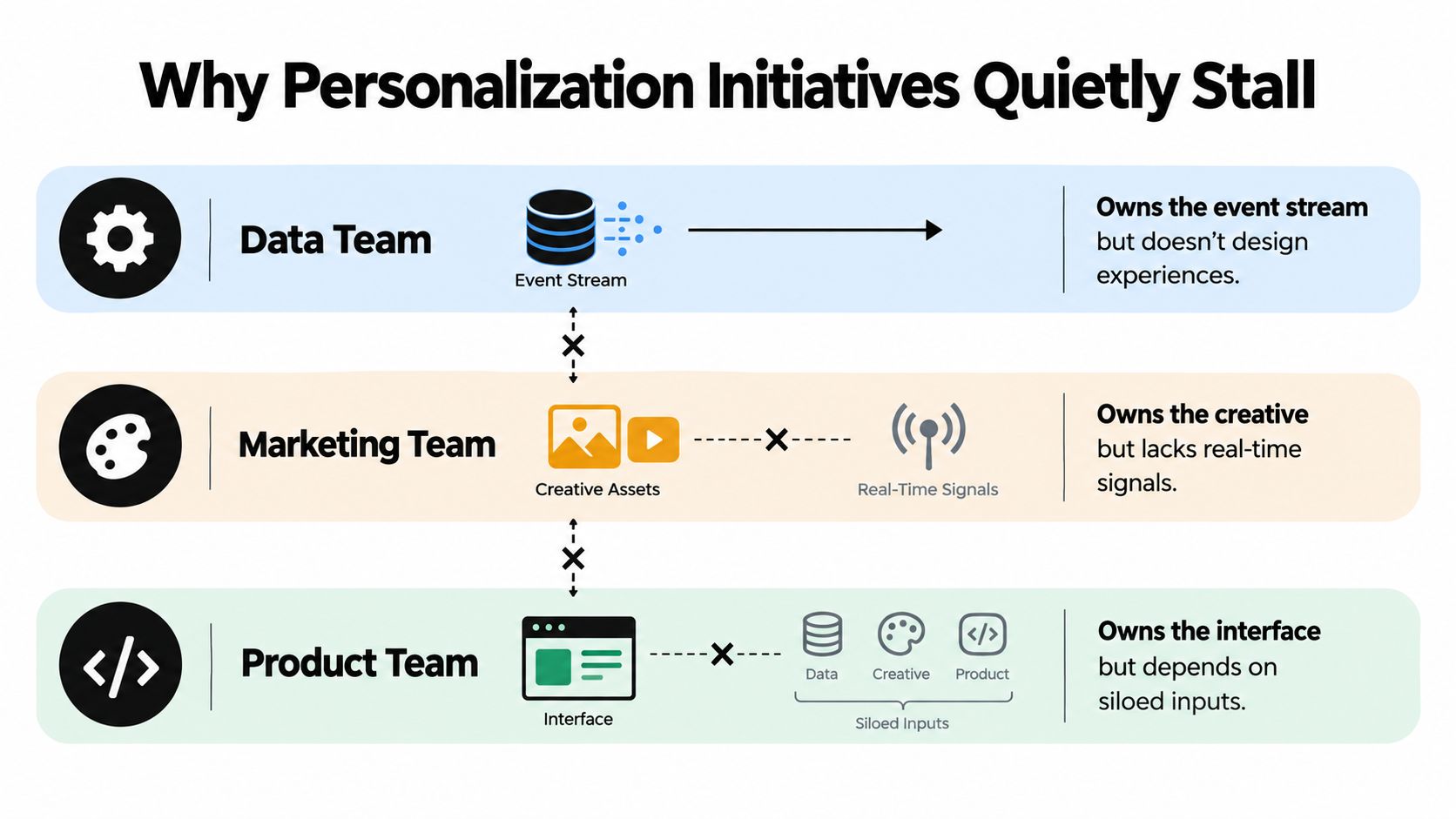
Most stalled personalization programs don't fail because the creative team picked the wrong headline. They fail because the work is split across teams that never fully connect.
The ownership gap
Data owns the event stream. Marketing owns the message. Product owns the interface. Nobody owns the full chain from signal to experience to measured lift.
That's more common than teams admit. PwC says the main barriers to personalization are unclear ownership, inaccessible data, weak coordination, and measurement that doesn't drive insight, and StackAdapt's 2026 survey found 68% of marketers are still in early implementation even though 87% plan to increase personalization spend, according to PwC's analysis of the personalization gap.
Three failure patterns show up again and again
- Data access breaks the chain. Customer signals sit in a warehouse or CDP, but the email tool, landing page system, or ad platform never receives them in a usable form.
- Measurement stays shallow. Teams compare clicks or opens without testing whether the personalized treatment created incremental lift.
- Iteration stops after launch. Rules get set once, models go stale, and no one retunes the experience as behavior changes.
A retailer can have a recommendation module live on the site and still get weak business impact if nobody reviews outputs, exclusions, placements, or fallback logic. The feature exists, but the program doesn't.
Customization can stall too
Customization has its own quiet failure mode. Teams build controls that look powerful in a roadmap review but feel like homework to real users.
Research on user-controlled customization found that effectiveness varies with user traits such as visualization literacy and locus of control. In practice, giving users more control can help some segments while adding cognitive load for others, according to the UBC paper on customization mechanisms.
If people need a tutorial to use the controls, you may have built a feature for internal stakeholders, not for customers.
The Revenue Case for Getting Personalization Right
A marketing manager often sees the same pattern. Paid traffic is coming in, creative is shipping, and reporting says the campaign is healthy. Then the landing page treats a first-time visitor from a high-intent search ad exactly the same as an existing customer clicking from email. Revenue gets left on the table at the experience layer.
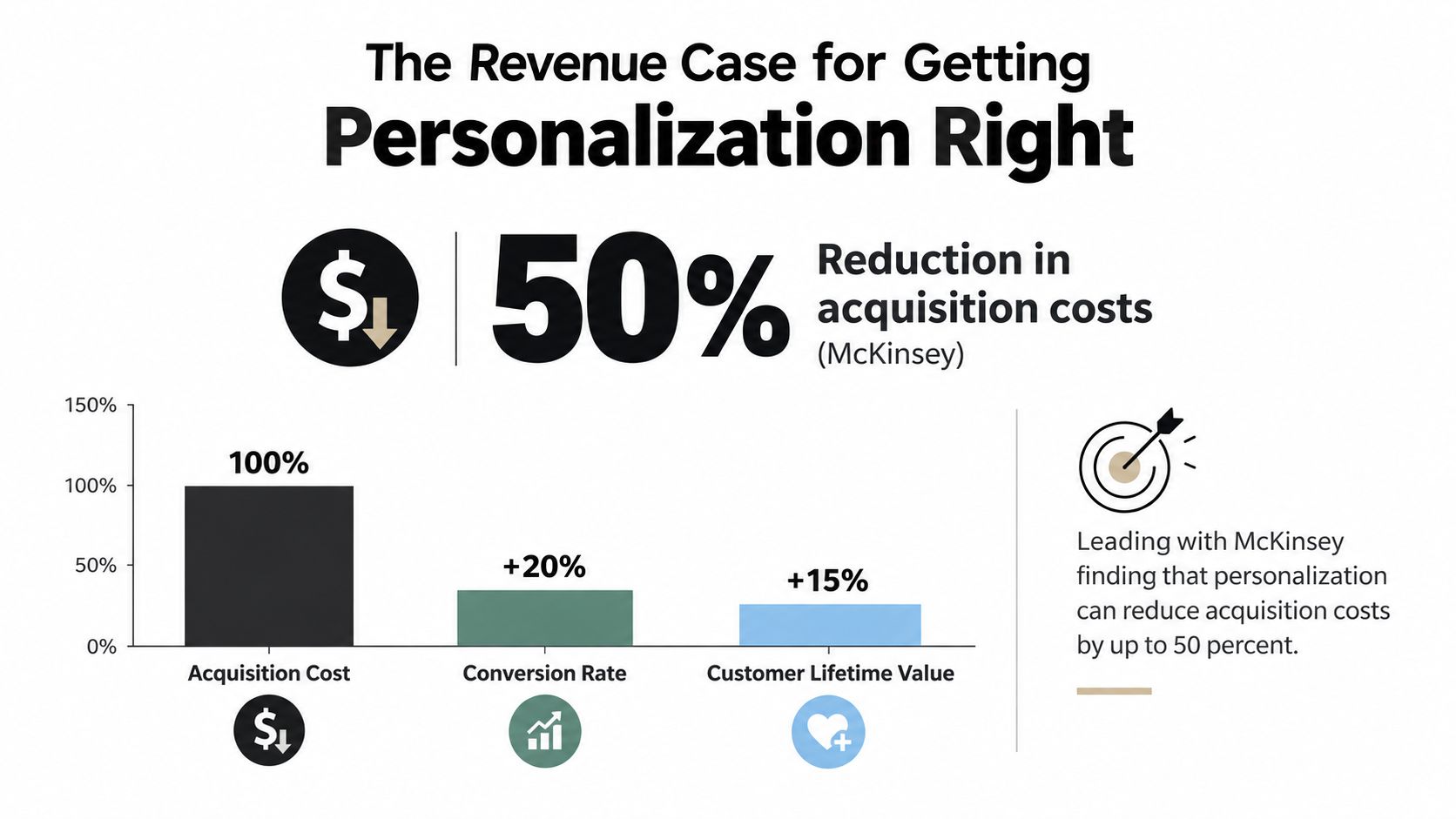
Earlier benchmarks gave the headline case for personalization. The planning question here is different: where does that upside come from, and what does a team need to build or buy to capture it?
Start with a simple campaign example. If a brand pays for three distinct audiences, but sends all three to the same page with the same proof points and the same CTA, it has bought targeting in media and lost it on arrival. Personalization earns revenue when the experience picks up where acquisition left off.
That is why the decision is often less about whether personalization matters and more about how to deliver it. Some teams build rules, templates, and data connections into their CMS or app. Others buy an experience-layer tool that can read incoming context and change copy, offers, modules, or paths without a long development cycle. Both routes can work. The tradeoff is operating-model fit.
What revenue impact looks like in practice
The gains usually show up in a few concrete places:
- Higher conversion from existing traffic. A visitor from a comparison keyword may need proof, pricing clarity, and objection handling. A returning customer may need speed and a relevant next step instead.
- Better monetization of strong intent. Product interest, account type, geography, or session behavior can change which message is most likely to move someone forward.
- More value from content already produced. If the team has creative assets but no reliable way to match them to context, the bottleneck is delivery, not production.
A related discipline is web conversion optimization, because a personalized page still needs strong structure, clear hierarchy, and persuasive offers.
The build-versus-buy question sits inside the revenue case
This is the part many comparisons skip.
Personalization can raise revenue, but only if the business can operate it week after week. A build approach gives more control, especially for teams with strong engineering support and clear experience logic. A buy approach can reduce time to value when the bottleneck is execution on live pages rather than model development or backend infrastructure.
The wrong choice creates drag fast. A team may build a decisioning setup, then realize nobody owns QA for variants, fallback content, or experiment readouts. Or it may buy a tool that changes page copy quickly, but never define who writes hypotheses, approves treatments, or reviews performance. In both cases, the technology exists and the revenue case weakens because the operating model is incomplete.
Tools focused on on-page decisioning help close that gap. Polish, for example, reads a landing page, writes headline, subheading, and CTA variants, serves them to visitors, and measures which version converts better. In retail, the same revenue logic shows up in merchandising, recommendation, and offer sequencing work, which is why examples like AI for ecommerce revenue boost are useful when teams want to see how operators tie AI changes to commercial outcomes.
Revenue follows changed experiences, not stored signals
A CDP, warehouse, or model has no commercial effect by itself. Revenue moves when those signals change what a person sees while deciding.
That sounds obvious, but it is where creep risk often begins too. Teams chase finer segmentation before they can reliably improve the page for broad, high-intent groups. In practice, the safer path is usually to start with earned context, such as channel, product category, lifecycle stage, or account status, and prove lift there before adding more sensitive or fragile logic.
Here's a short explainer on the broader topic before teams go deeper into implementation:
The commercial case is straightforward. Personalization earns its keep when it changes the experience in ways that increase conversion, average order value, retention, or sales efficiency, and when the team has a workable way to keep those experiences accurate over time.
The Creep Factor and Other Risks of Over-Personalizing
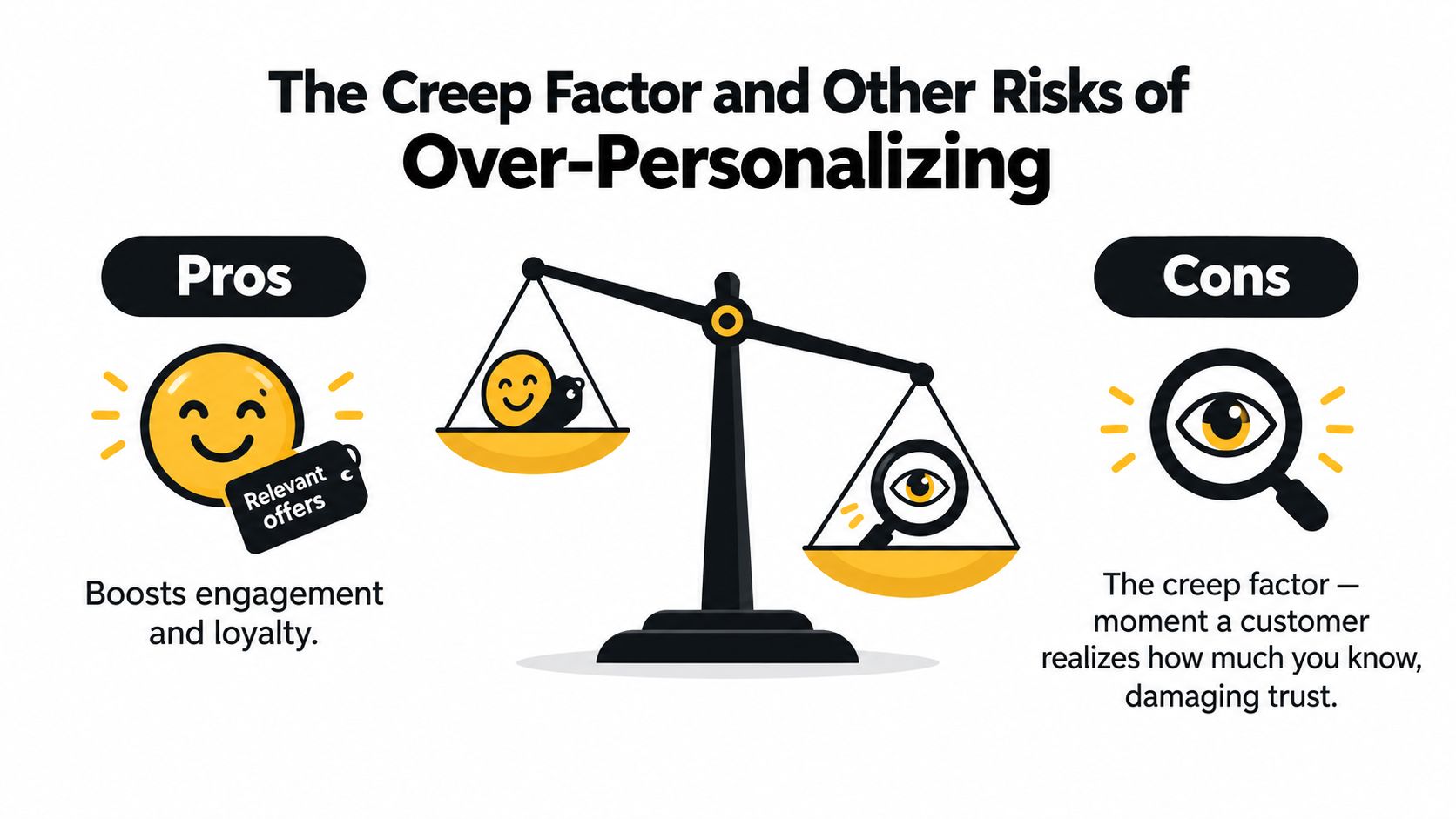
A shopper clicks a retargeting ad for running shoes, lands on your site, and sees a helpful nudge toward the category they were already exploring. That feels normal. If the next email mentions the exact time they browsed, combines it with location cues, and keeps repeating the same product for two weeks, the experience shifts from useful to unsettling.
Where helpful turns intrusive
The easiest way to judge the line is to ask whether the brand earned the context. A first-name subject line is common. A landing page that adapts to ad intent is easy to explain. A message built from sensitive inferences, stitched-together behaviors, or details the customer never knowingly shared creates a very different reaction.
That reaction is not only about privacy. It is also about surprise.
If people cannot tell why they are seeing a message, they start questioning the experience layer itself. For a marketing manager, that matters because personalization is a build-versus-buy decision in practice. You are either building rules, data flows, and review processes that can support these moments safely, or buying tools that promise them faster. In both cases, the risk sits in the operating model, not only in the copy on the page.
A 2026 consumer survey found that 77% notice personalized marketing often or constantly, while only 27% say brands understand their interests very well. It also found that 55% feel uncomfortable when marketing references something specific about them, 43% have stopped buying from a brand because personalization felt repetitive, too personal, or off-base, and 69% worry about privacy when hyper-personalization uses personal data, according to Site Impact's personalization reality check report.
The bigger risk is operating-model creep
Over-personalization often starts as a sensible test. Then the experience layer keeps expanding. One team adds more audience rules. Another adds more data inputs. A vendor introduces predictive traits. Creative review gets harder, QA takes longer, and nobody is fully sure which combinations are live.
That is creep risk.
The issue is not only that a message may feel too personal. The issue is that the organization commits to maintaining dozens of fragile experiences it cannot reliably explain, govern, or measure.
Common failure modes look like this:
- Repetition fatigue: one recommendation keeps following the customer across email, ads, and onsite surfaces long after interest has faded.
- Narrowed discovery: the system keeps optimizing for prior clicks and stops helping people explore adjacent products or use cases.
- High maintenance, low return: teams build tiny segments that add production and QA work without enough revenue upside.
- Consent and compliance gaps: data use expands faster than legal review, preference management, or channel-level controls.
Every personalized touch draws from a trust budget. Broad context spends less. Specific, hard-to-explain inferences spend more.
Restraint usually produces a stronger program
A good rule is to personalize hardest where the customer would reasonably expect it. Cart recovery, account-aware support, replenishment reminders, and campaign-specific landing pages usually pass that test because the context is recent and visible.
Use more caution when the logic depends on inferred traits, cross-channel stitching, or signals a customer would struggle to recognize. If your team cannot explain the experience in one plain sentence, the program is probably ahead of its operating model.
That is the part many comparisons miss. The question is not only whether personalization can be more relevant than customization. The question is whether your team can support that relevance at the experience layer without creating trust debt, governance gaps, and maintenance load that grows faster than the return.
Choosing and Sequencing Your Personalization Strategy
The right choice usually becomes clear when you answer three questions in order.
Start with who should decide
Ask this first: Should the brand make the experience simpler, or should the user control it directly?
If the customer is busy, low intent, or unlikely to configure anything, personalization usually wins. If the customer has specialized needs or wants precision, customization tends to work better.
Then check what you can actually support
A great personalization idea without clean signals is still a weak plan. A rich customization interface that asks too much work from users is also a weak plan.
Use the systems you already trust. If you have reliable behavioral triggers, start there. If you have a product where users repeatedly shape their own workflow, lean into customization. If you have both, layer them.
One practical way to reduce guesswork is to test traffic allocation and treatment selection with controlled experimentation methods like multi-armed bandit, especially when you're comparing multiple experience variants in live traffic.
Personalization vs Customization Decision Matrix
| Situation | Recommended Approach | Phase | Key Guardrail |
|---|---|---|---|
| Paid traffic landing on one generic page | Personalization | Start now | Use clear holdouts and measure lift |
| Returning visitors with repeat intent patterns | Personalization | Early | Limit sensitive inferences |
| Complex product with many valid user setups | Customization | Early to mid | Keep controls simple and progressive |
| Dashboard or workspace used by different roles | Customization | Mid | Avoid clutter and default overload |
| System has strong signals and users need control too | Hybrid | Mid to advanced | Make the default editable |
| Team lacks data readiness but wants relevance | Light customization first | Start now | Collect declared preferences carefully |
A sensible sequence for most teams
- Begin with visible wins: Behavioral email triggers, basic on-site content swaps, and recommendation defaults
- Add stronger decisioning next: Audience rules, predicted intent, and more precise landing page adaptation
- Build heavier experiences later: Configurators, account-level journeys, and cross-channel orchestration
- Run governance in parallel: Consent capture, model review, frequency limits, and a working opt-out path
That sequence keeps the program grounded. You earn complexity instead of assuming it.
The shortest version is this. Use personalization when the brand has the better context. Use customization when the user has the better context. Use both when each side knows something the other doesn't.
Polish helps teams act on this distinction at the page level. It reads your landing page, writes and serves new headline, subheading, and CTA variants, measures what converts, and keeps the winner live so your on-site messaging can adapt without a heavy manual testing loop. If that's the layer you're trying to improve, visit Polish.
- personalization and customization
- personalization vs customization
- marketing personalization
- customization UX
- CRO strategy
Your website rewrites itself until it converts.
Polish writes new versions of your headlines and CTAs, tests them on your real visitors and keeps the ones that win.
Start free